DND Meaning on iPhone: What Does DND Mean?

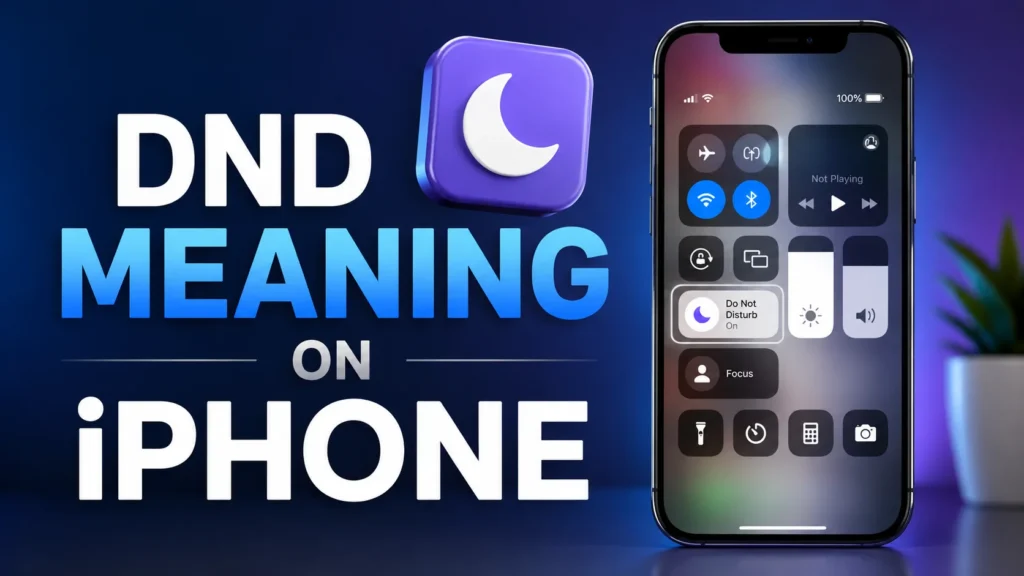
If you have noticed a crescent moon icon on your iPhone or seen DND mentioned in a message, you may wonder, “What does DND mean on iPhone?”
DND stands for Do Not Disturb. On modern iPhones, Do Not Disturb is part of Apple’s Focus feature. It is designed to reduce interruptions by silencing calls, alerts, and notifications according to the settings you choose.
In simple words, DND on iPhone means your phone is set to limit distractions.
It does not necessarily mean the phone is turned off, disconnected from the internet, or unavailable. Your messages and notifications can still arrive; your iPhone simply controls how and when they interrupt you.
DND Meaning on iPhone – Quick Meaning
DND means “Do Not Disturb.”
On an iPhone, it is a Focus mode that can silence incoming calls, texts, alerts, and other notifications while you are concentrating, sleeping, working, studying, or simply taking a break.
Here is the easiest way to understand it:
- DND = Do Not Disturb
- It is part of Focus on iPhone.
- It can silence calls, alerts, and notifications.
- You can allow selected people or apps to contact you.
- You can schedule DND to activate automatically.
- Other people may see that your notifications are silenced if Focus Status is shared.
For example:
“My iPhone is on DND, so I’ll check your message later.”
“I turned on DND while studying.”
“She has DND on, but she’ll probably see the message afterward.”
DND Meaning: Why Does DND Appear on an iPhone?
DND appears because the Do Not Disturb Focus has been activated.
When DND is active, a crescent moon icon can appear in the iPhone status area and on the Lock Screen. Apple identifies this as the Do Not Disturb status icon.
You may turn it on intentionally when you want quiet time. It can also activate automatically because of a schedule, a linked Lock Screen, or another Focus-related setting.
This is why someone might suddenly notice that their iPhone is on DND without remembering manually enabling it.
How DND Works on iPhone
DND is more flexible than simply putting your iPhone on silent.
When Do Not Disturb is active, your iPhone can silence notifications while still allowing you to decide which people or apps are important enough to interrupt you.
Apple allows you to customize People and Apps within a Focus. You can choose specific contacts whose notifications are allowed and decide which applications can send alerts during DND.
You can also allow repeated calls or configure emergency contacts so important communication is not unnecessarily blocked.
That makes DND useful for situations where you want fewer interruptions without completely cutting yourself off.
DND Meaning vs. Silent Mode on iPhone
DND and Silent Mode are often confused, but they are not exactly the same.
Silent Mode mainly prevents your iPhone from ringing or playing alert sounds. Your iPhone can still display notifications.
Do Not Disturb, on the other hand, is a Focus setting that controls notifications and interruptions according to your chosen rules.
Think of it this way:
| Feature | Silent Mode | DND / Do Not Disturb |
|---|---|---|
| Main purpose | Mute sounds | Reduce interruptions |
| Calls | Usually no ringtone | Can be silenced according to Focus settings |
| Notifications | Can still appear | Can be silenced or filtered |
| Specific people allowed | Limited | Yes |
| Specific apps allowed | Not the main function | Yes |
| Scheduling | Not its main purpose | Yes |
| Part of Focus | No | Yes |
Key Insight
Silent Mode is primarily about sound, while DND is about managing interruptions.
Real-Life Conversations About DND on iPhone
Understanding how people actually talk about DND can make the term much easier to recognize.
WhatsApp Conversation
Person A: Why didn’t you answer my call?
Person B: Sorry, my iPhone was on DND. I was studying.
Person A: Oh, okay. I thought you were ignoring me.
Person B: No way. I just needed some quiet time.
Here, DND explains why the person did not immediately respond.
Instagram DM
Person A: You disappeared yesterday 😂
Person B: I had DND on most of the evening.
Person A: So you actually saw my message?
Person B: I saw it later. I wasn’t checking my phone.
The important point is that DND does not automatically mean someone never received a message.
Text Message
Person A: Call me when you can.
Person B: I’m on DND right now. I’ll call you after work.
In this context, DND communicates that the person is temporarily limiting interruptions.
TikTok Comment
Person A: Why does my iPhone show a moon next to my name?
Person B: Your DND Focus is probably on.
Person A: Ohhh, that explains why my notifications are quiet.
This is a common situation for someone who has just started using Focus settings.
What Does DND Mean in Messages?
One of the most confusing aspects of DND is seeing a message indicating that someone has notifications silenced.
When Focus Status is enabled, people who contact you through supported Apple communication features such as Messages may be shown that your notifications are silenced.
This does not automatically mean:
- They blocked you.
- Their iPhone is switched off.
- They have no internet.
- They deleted your message.
- They are deliberately ignoring you.
It generally means that their Focus settings are currently limiting notifications.
Apple also allows users to control whether their Focus Status is shared.
Emotional & Psychological Meaning of DND
Although DND is a technical setting, it can have a surprisingly personal meaning in everyday life.
People often activate DND because they need mental space.
A student might use it before an important exam. Someone working on a deadline may turn it on to avoid constant interruptions. Another person may use DND before sleeping because they want their phone to stop demanding attention.
In modern communication, immediate responses can sometimes feel like an obligation.
DND creates a small boundary between being reachable and being constantly available.
For example, imagine receiving messages every few minutes while trying to finish an important task. Even if each message is harmless, the repeated interruptions can break concentration.
Turning on DND can be a simple way of saying to yourself, “I’ll respond when I’m ready.”
That does not necessarily reflect anger, rejection, or disinterest.
Usage of DND in Different Contexts
DND on Social Media
On social media, people sometimes mention DND when explaining delayed replies.
You might see:
“Sorry for the late reply. Had DND on.”
The phrase is generally casual and easy to understand among people who regularly use smartphones.
DND With Friends and Relationships
Friends may use DND when they need uninterrupted time.
In relationships, however, context matters. If someone repeatedly disappears without explanation, another person may interpret the behavior emotionally.
DND itself does not tell you why someone is unavailable.
It only indicates that notifications are being managed.
DND at Work
DND can be especially useful during meetings, focused work, presentations, or study sessions.
Someone might say:
“I’ll reply after the meeting. I have DND enabled.”
That communicates a temporary boundary without suggesting that the person is unwilling to communicate.
Casual vs Serious Tone
The abbreviation DND is usually casual and technology-related.
It works naturally in:
- Text messages
- Group chats
- Social media conversations
- Personal conversations
- Informal workplace chats
For a formal email, writing Do Not Disturb may be clearer than simply using DND, particularly if the audience may not know the abbreviation.
When Not to Use or Assume DND
DND is easy to understand, but you should avoid making assumptions about someone’s intentions based only on their Focus status.
Don’t Assume Someone Is Ignoring You
A silenced notification does not prove that someone saw your message and deliberately chose not to respond.
They could be sleeping, working, studying, driving, exercising, or simply taking a break from their phone.
Don’t Treat DND as a Personal Rejection
If someone has DND enabled, it is usually a device setting rather than an emotional statement.
Avoid immediately interpreting it as:
“They don’t want to talk to me.”
That conclusion requires more context.
Be Careful With Urgent Situations
DND can be customized to allow certain people and notifications, but you should not assume every urgent message will automatically interrupt someone.
If something is genuinely important, use the appropriate communication method rather than relying on a person’s Focus settings.
Common Misunderstandings About DND on iPhone
“DND Means the iPhone Is Off”
No. The iPhone can remain fully powered on and connected while DND is active.
“DND Means Messages Are Not Delivered”
Not necessarily.
DND primarily controls how notifications interrupt the user. Messages can still arrive while notifications are silenced.
“DND Means Someone Blocked Me”
No. DND and blocking are different features.
A person can have DND turned on while still receiving communication according to their Focus settings.
“DND Means Nobody Can Call”
Not necessarily.
Users can customize which people are allowed to notify them during a Focus. Apple also provides options involving repeated calls and emergency contacts.
“DND and Silent Mode Are the Same”
They are different.
Silent Mode focuses mainly on sound, whereas DND is a Focus feature designed to manage interruptions and notifications.
DND Variations and Related iPhone Features
DND is part of a broader Focus system. These related options can sometimes cause confusion.
1. Do Not Disturb
The classic DND option for reducing calls, alerts, and notifications.
2. Personal Focus
A Focus designed around personal time, with its own notification rules.
3. Work Focus
Useful for limiting personal distractions while allowing work-related people or apps through.
4. Sleep Focus
Designed to reduce interruptions during sleeping hours and can follow a sleep schedule.
5. Driving Focus
Designed to reduce distractions while driving and can automatically activate under certain conditions.
6. Fitness Focus
Can be used to limit distractions during workouts or physical activity.
7. Gaming Focus
Helps create a more focused environment while playing games.
8. Reading Focus
Useful when you want to concentrate on reading without constant alerts.
9. Custom Focus
You can create a custom Focus around your own routine or activity.
10. Reduce Interruptions
On supported devices and configurations, Apple provides a Focus option designed to prioritize important notifications while reducing less important interruptions.
How to Turn DND On or Off on iPhone
Turning DND on or off is straightforward.
To Turn DND On
- Open Control Center.
- Tap Focus.
- Select Do Not Disturb.
- Choose a duration if prompted.
Apple also allows you to activate DND from the Settings > Focus area.
To Turn DND Off
Open Control Center, tap the active Focus option, and select Do Not Disturb again to turn it off.
You can also touch and hold the Focus icon from the Lock Screen and turn off the active Focus.
Why Does DND Keep Turning On by Itself?
If DND keeps activating, don’t assume your iPhone is malfunctioning.
A schedule may be configured.
Go to:
Settings → Focus → Do Not Disturb → Set a Schedule
Check whether DND has been scheduled for a particular time, location, or other trigger. Apple also allows Focus modes to activate automatically based on conditions such as time, location, or app usage.
A Lock Screen connected to Do Not Disturb can also activate the Focus when selected.
How to Customize DND on iPhone
DND does not have to silence everything.
Go to Settings → Focus → Do Not Disturb.
From there, you can customize notification behavior, choose people and apps that can notify you, configure schedules, adjust screens, and use Focus Filters where supported.
This makes DND more practical than simply muting the entire phone.
For example, you could create a study routine where most notifications remain quiet while selected contacts or apps can still reach you.
DND Meaning: How to Respond When Someone Has DND On
You usually do not need a complicated response.
Casual Replies
- “No worries, reply whenever you’re free.”
- “All good!”
- “Okay, talk later.”
Funny Replies
- “Your iPhone said peace before you did 😂”
- “DND really put you on airplane mode emotionally 😂”
- “Okay, I’ll wait for the moon to disappear.”
Mature Replies
- “No problem. Take your time.”
- “I understand. Message me when you’re available.”
- “That’s completely fine.”
Respectful Replies
- “Sure, I’ll wait until you’re free.”
- “No worries, I respect your space.”
- “Take care. We can talk later.”
The best response depends on your relationship with the person and the reason they enabled DND.
DND Meaning: Regional & Cultural Usage
The technical meaning of DND remains the same worldwide, but the way people interpret delayed responses can differ culturally.
Western Culture
In many Western communication environments, DND can represent a normal digital boundary.
Someone may turn it on during work, exercise, sleep, or personal time without expecting others to take it personally.
Asian Culture
In many Asian social settings, quick replies can sometimes carry stronger expectations, especially among close friends, family members, or colleagues.
That can make DND particularly useful for creating a polite communication boundary.
Still, context is important because communication habits vary greatly between individuals.
Middle Eastern Culture
Family communication can be especially important in many Middle Eastern communities.
People may therefore prefer allowing selected contacts to reach them even while using DND.
The technology is the same, but the social meaning of availability can vary from person to person.
Global Internet Usage
Online, DND is widely understood as shorthand for Do Not Disturb.
People use it in texts, gaming communities, group chats, social platforms, and everyday conversations.
Gen Z vs Millennials
Younger users may casually write:
“I’m on DND rn.”
Older users may be more likely to write:
“My phone is on Do Not Disturb.”
Both expressions communicate essentially the same idea.
DND Meaning: Is It Safe for Kids?
Yes, DND itself is a normal iPhone feature.
For children and teenagers, it can be useful during homework, bedtime, school, family time, or other activities where constant notifications can become distracting.
Parents should understand that DND is primarily a notification-management feature, not a complete parental-control system.
The exact behavior depends on the Focus settings, allowed contacts, apps, schedules, and other configurations.
For younger users, it can be helpful to establish clear rules about when DND should be used and which important contacts should remain reachable.
FAQs About DND Meaning on iPhone
What does DND mean on iPhone?
DND means Do Not Disturb. It is a Focus feature that helps silence or manage calls, alerts, and notifications so you can reduce interruptions.
Does DND mean someone blocked me?
No. DND does not mean you have been blocked. It indicates that the person’s Focus settings are limiting notifications or interruptions.
Can you still receive messages on DND?
Yes. DND mainly controls notification interruptions. Messages can still arrive, depending on the person’s settings.
Can someone call me when my iPhone is on DND?
It depends on the DND settings. iPhone users can allow notifications and calls from selected people and can configure options such as repeated calls.
What does the moon icon mean on iPhone?
The crescent moon icon generally indicates that Do Not Disturb is active. Apple lists it as the status icon for DND.
Why does my iPhone automatically turn on DND?
A schedule, automation-like Focus condition, or a Lock Screen linked to DND may be responsible. Check Settings → Focus → Do Not Disturb → Set a Schedule.
Does DND silence all notifications?
Not always. DND can be customized so selected people or apps are still allowed to send notifications.
Conclusion
So, DND meaning on iPhone is simple: DND stands for Do Not Disturb, a Focus feature designed to reduce interruptions from calls, alerts, and notifications.
Seeing DND does not mean an iPhone is switched off. It does not automatically mean someone is ignoring you, either.
The most useful thing to remember is that DND is customizable. Users can schedule it, allow selected contacts or apps, share their Focus Status, and adjust how notifications behave.
Once you understand that difference, the crescent moon icon becomes much less mysterious.
Whether you’re studying, sleeping, working, or simply taking a break from constant notifications, DND gives you something increasingly valuable in modern digital life: the ability to choose when you want to be interrupted.